Introducing MLT Player
There is a category of media software that almost disappeared.
A normal media player is designed to play a file. An NLE is designed to turn that file into part of a larger editing project. But there used to be something in between: software where the media file itself was the workspace.
QuickTime 7 Pro was probably the clearest example. You could open a video, inspect it frame by frame, make a precise selection, trim it, export a frame or a new file, and close the application. You did not have to build an editing project around the source before you could do useful work with it.
The File Is Not the Unit of Thought
Redleaf and MLT Player were built around the same argument: the file can remain the unit of storage without remaining the unit of thought.
Redleaf approaches that problem through documents, transcripts, entities, passages, and relationships. MLT Player approaches it through media, time, and visual structure. One lets me begin with meaning and descend toward an exact place in a source. The other lets me begin with the source, turn time into something I can see at once, and move back toward meaning.
The Gradient Tool Should Not Exist
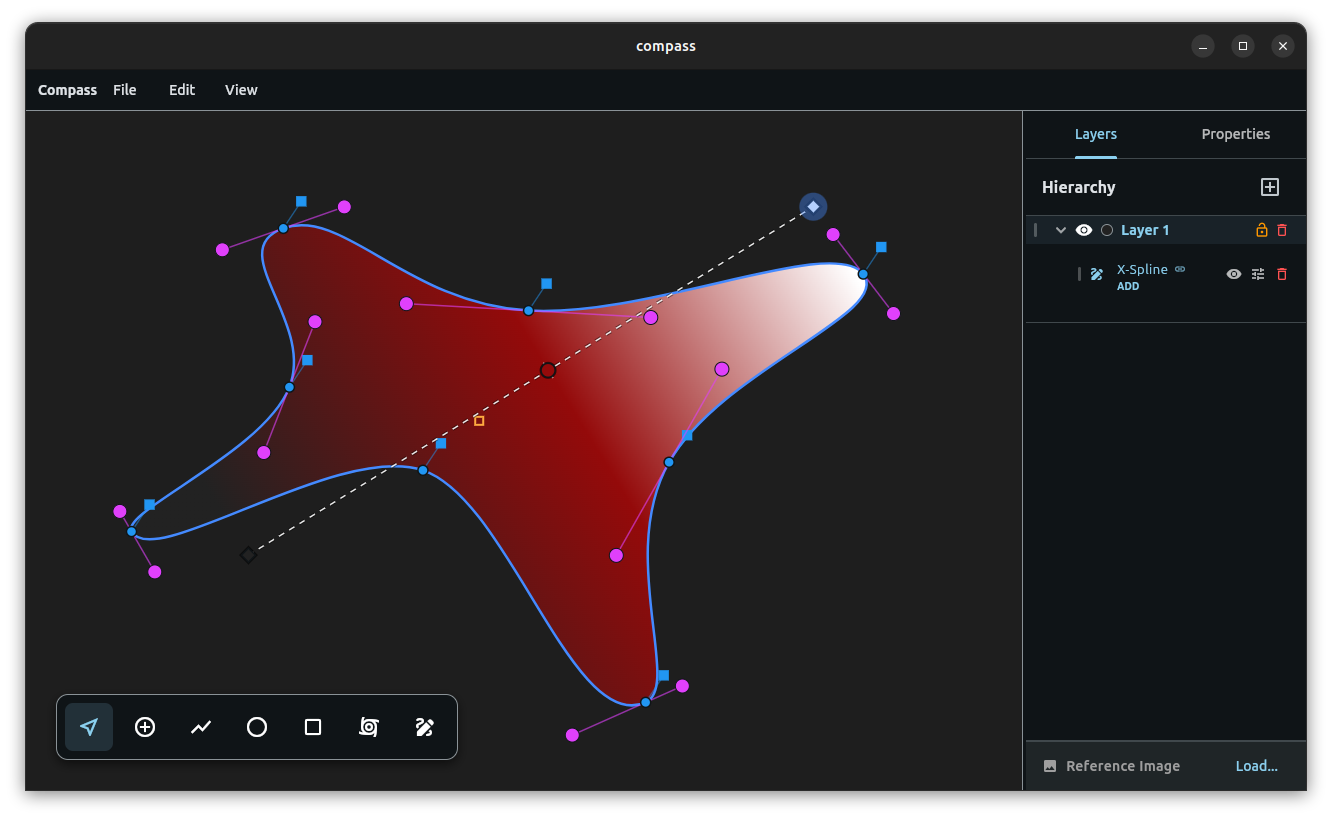
Compass has reached a major milestone. It now supports direct Linear Gradients and fully editable Gradient Meshes, but the important part is not simply that Compass has gradients. Illustrator has gradients. Inkscape has gradients. Every serious vector application has gradients.
The difference is that Compass does not need a Gradient Tool.
The Toolbar Is a Physical Metaphor
Most graphic design software is organized like a physical toolbox. You choose the Selection Tool, then the Pen Tool, then the Rotation Tool, and finally the Gradient Tool. Each function is represented as a separate instrument that must be picked up before the software allows you to perform a particular kind of edit.
Compass Debian Test
Compass is a love letter to my frustrations with vector design.
For decades we’ve accepted an odd compromise: vector software asks us to think mathematically while forcing us to work mechanically. We switch modes, expand strokes, rebuild geometry, and destroy information over and over just to keep designing. There is no technical reason for any of it.
Compass could have existed in 1998. It would have been written in C++, required a vastly larger engineering effort, and likely been prohibitively expensive to build — but the mathematics were always there. What persisted instead wasn’t a technical limitation. It was an interaction paradigm.
Compass
When I studied graphic design in college, we were taught structure.
We learned proportion, grid systems, alignment, hierarchy, and intentionality.
Then we opened the software, and all of that disappeared.
Whether it’s Illustrator, Figma, or open-source alternatives like Inkscape, traditional 2D vector software does not actually understand design principles. It hands you an unopinionated Bézier spline and treats you like a digital painter. You spend hours manually nudging handles and anchor points, trying to force precision out of tools that were never structurally aware to begin with.
Redleaf 2.5: Why Chat Doesn't Scale for Deep Research
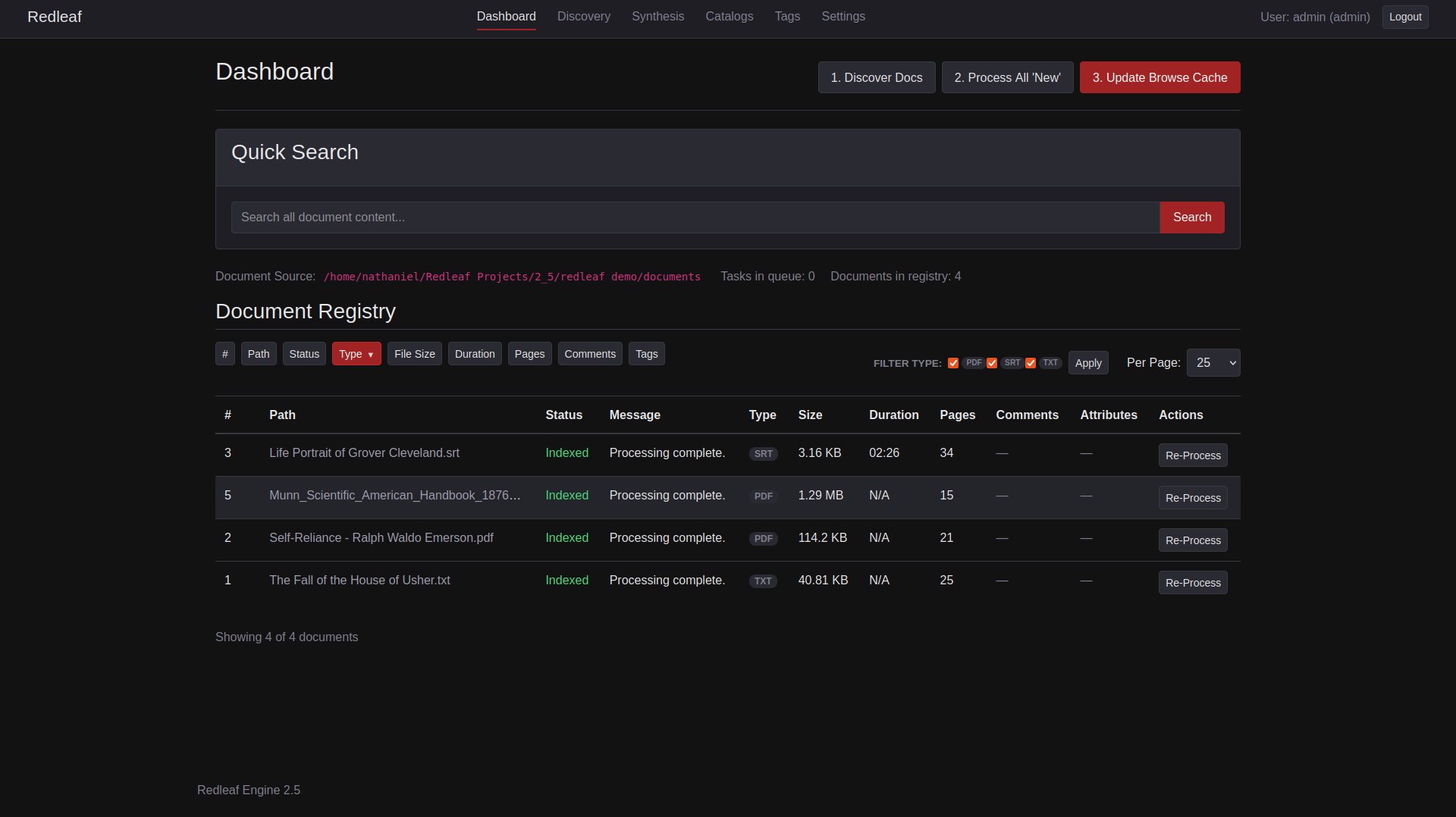
Redleaf Engine 2.5’s updated dashboard
Redleaf was originally built to solve a human problem. In early 2025, LLMs were unreliable for deep research: feed them a long document, and they would lose the thread halfway through. So, I built Redleaf to help people do RAG properly—extract entities, map relationships, and navigate information as a living structure instead of a wall of text.
Then, something changed.
As open-weight models improved, they stopped feeling like simple token generators and started behaving more like agents. In that shift, something unexpected happened.
Virtual Folders
Redleaf’s design mission has always been portability: a fully processed knowledge graph, encapsulated in a single folder, ready to hand to a colleague.
But building a local first knowledge engine inevitably runs into a very physical constraint: data gravity.
With a few dozen PDFs, keeping everything neatly inside a documents/ directory is trivial. At the scale of terabytes, historical archives, podcast libraries, parsed email dumps, that requirement becomes friction.
You cannot always bring the data into your workspace. Sometimes you have to meet it where it lives.
EchoText Update
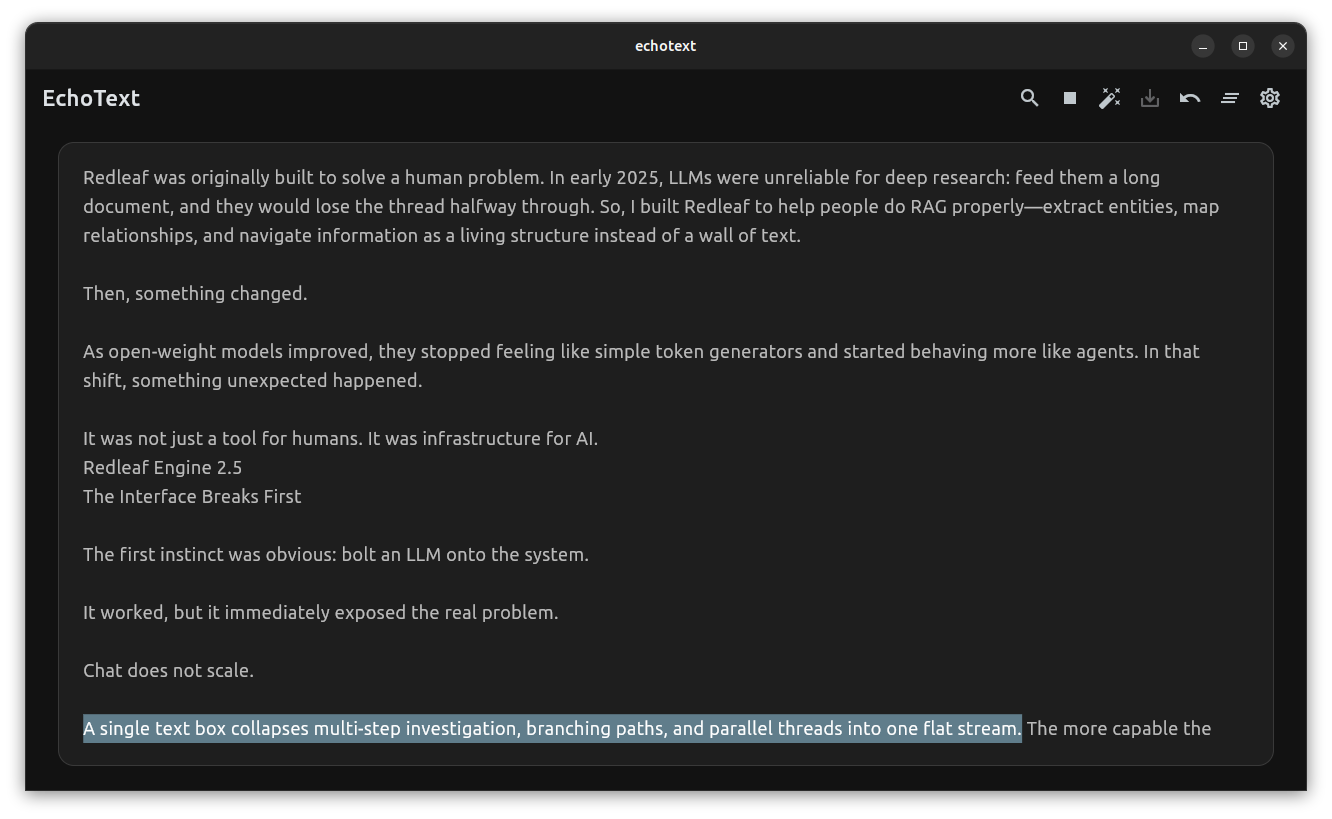
Updated Screenshot April 29 2026
Text-to-speech has taken a massive leap this decade. We’ve gone from digging through obscure Tacotron papers to listening to neural voices that are nearly indistinguishable from human narration.
There’s just one problem: the best tools are usually locked behind a paywall.
There are open-source, local alternatives—but they tend to be difficult to set up and even harder to integrate into a daily workflow. That gap is what led me to build EchoText.
Organizing Context in Node Leaf
In a spatial environment, structure should be visible at a glance instead of something you have to reconstruct by squinting at a long chain of nodes.
When I first built Node Leaf, there was no Merge Node. And at the time, that made sense.
Assembling context for an LLM is not like video compositing. You are not layering A over B. The model does not care about visual stacking or strict ordering. It just needs access to the full set of inputs.
Agentic Wiki
Modern AI chat interfaces boast massive context windows, yet they remain fundamentally constrained by one critical flaw: they are ephemeral.
You can spend hours curating inputs, extracting insights, and refining ideas within a session—but the moment that session ends, the structure of that knowledge collapses. What remains is not a system, but a transcript.
Return a month later, and you don’t continue forward, you reconstruct from fragments.
This makes chat interfaces powerful for isolated problem-solving, but fundamentally inadequate for long-term, compounding research. There is no continuity. No accumulation. No persistent state.
Redleaf Hub
Redleaf was built around the Flask framework because it aligns perfectly with the core ethos of the project. Flask enabled me to build Redleaf as a highly portable and team-based system—one simple enough to either run over a local network or distribute as a standalone, precomputed project folder.
However, to use the Redleaf Engine alongside the Node Leaf visual canvas, you often had to juggle multiple steps—open a terminal, navigate directories, activate environments, start backend services, and launch the interface. Each step adds friction. And friction is the enemy of flow.
Human RAG: The Forgotten Half of Retrieval
The AI industry is currently fixated on RAG (Retrieval-Augmented Generation). The premise is straightforward: an LLM is only as effective as the context it receives, so we augment prompts with relevant information retrieved from vector databases.
This approach works well, for machines.
But it quietly overlooks something critical: the human in the loop.
Before RAG became a buzzword, we called this process something much simpler, search. But search has fundamentally degraded for humans. We’ve watched the death of powerful, standalone search utilities (like the old Google Search Appliance hardware) in favor of walled-garden cloud storage like Google Drive, where finding a specific document feels like a roll of the dice.
Node Leaf
https://github.com/nathanfx330/node-leaf
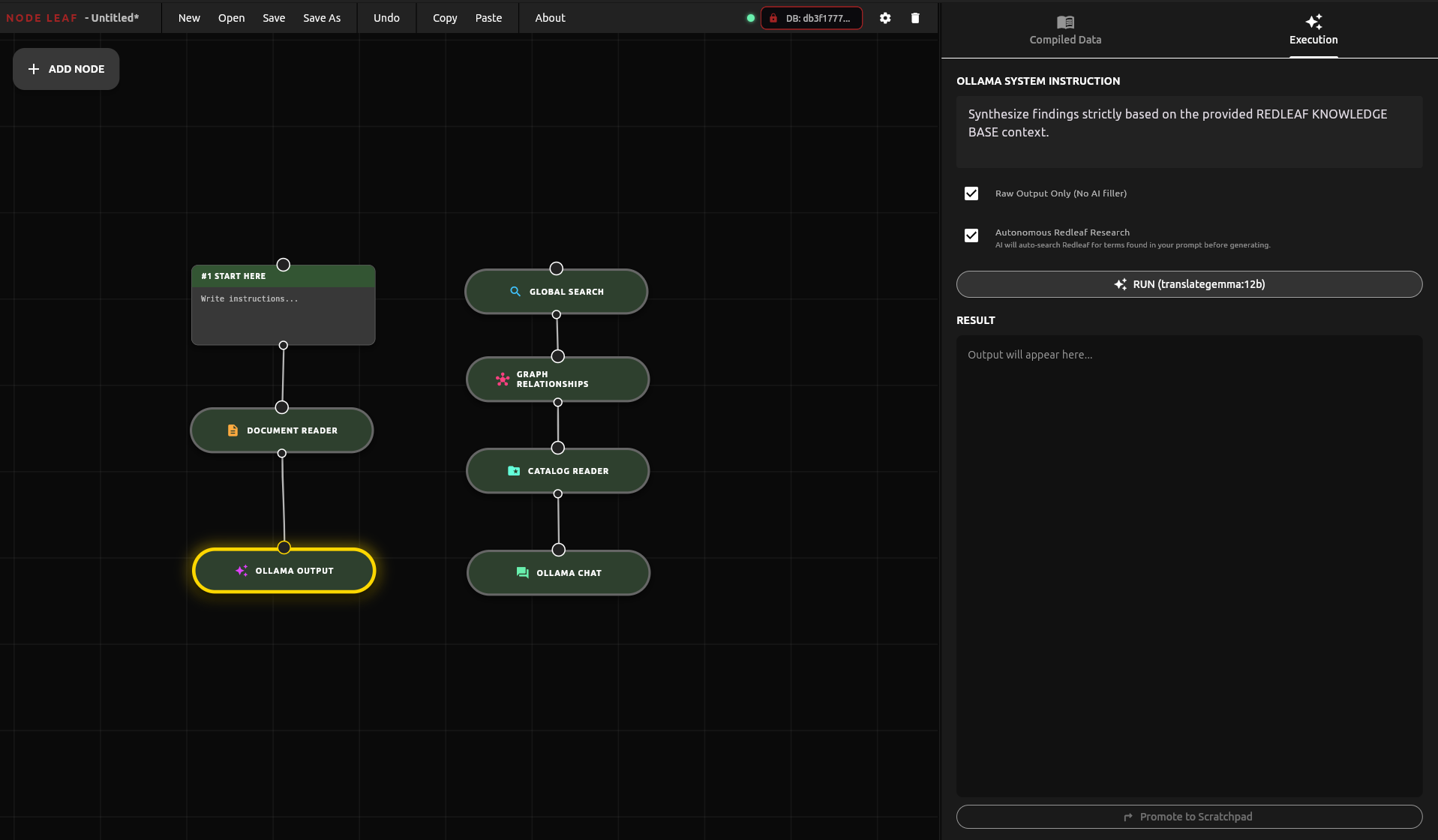
I recently reached a major milestone in a long-term personal project: a nodal word processor built in Flutter. Designed to integrate with the Redleaf knowledge engine, this application structures writing and research into a visual web of nodes that pipe data directly into local LLMs through Ollama. I started Node Writer to pursue a long-held dream of creating a nodal word processor, with the vision that it would naturally merge with Redleaf’s development—evolving into an assistant that grows its ability to help you work with nodes.
Deep Writer
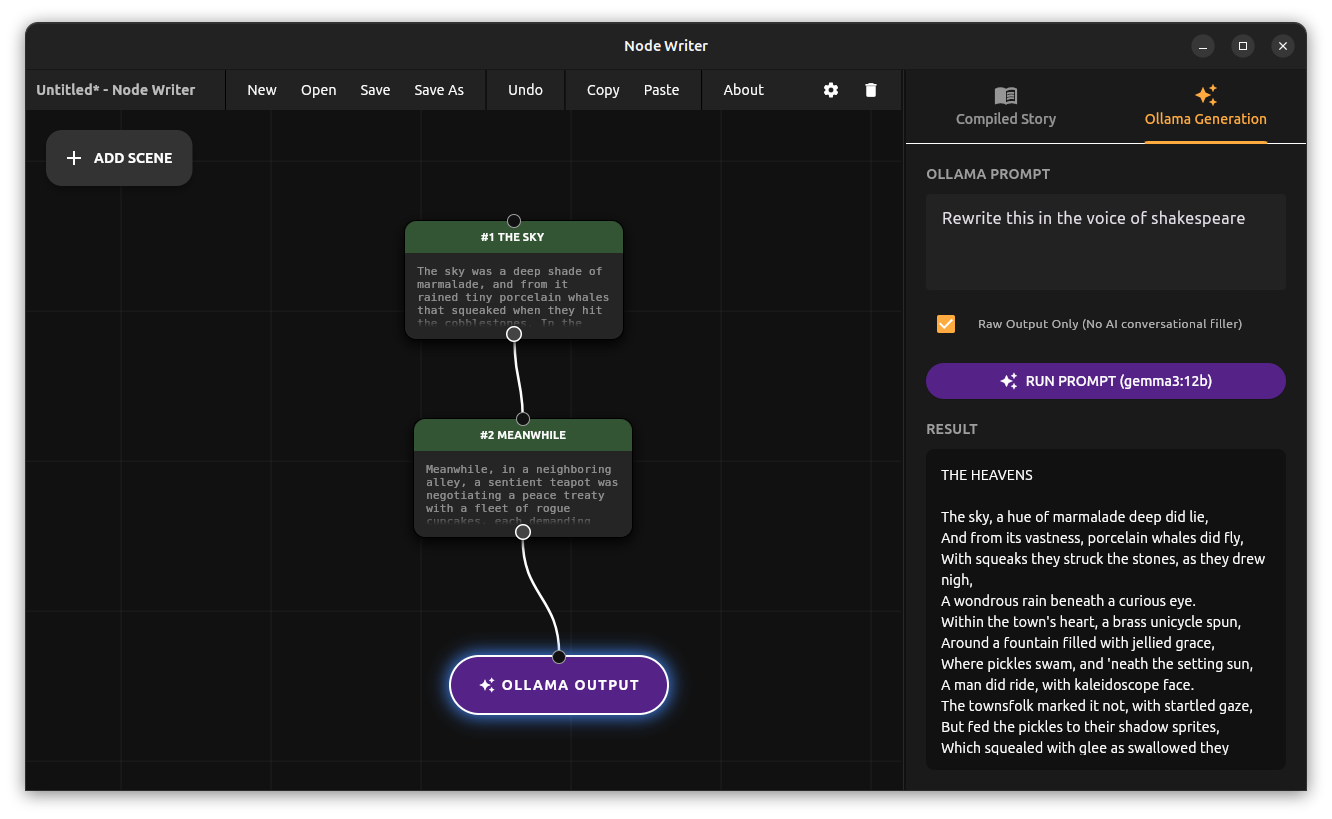
Deep Writer
But that release was only the first milestone.
Node Writer
My first word processor was ClarisWorks on Mac OS 8 in the late nineties. Since then, nothing has changed. We are still staring at a fake digital piece of paper. After years of Microsoft Word, LibreOffice, and Google Docs, the core experience remains exactly the same. Moving text with a cursor is a tedious, character-by-character chore, with no simple way to rearrange blocks of writing. Writing is about abstracting ideas, exploring structure, and developing details. We get so caught up in modern UX capabilities that we forget to innovate. Too often, we don’t reinvent the paradigm, we just digitize it.
Redleaf Ai Assistant
🔎 How the Terminal AI Assistant Works
The assistant provides a two-step workflow: first search and summarize, then follow-up question mode.
1️⃣ Search and Summarize
When you issue a query, the assistant can:
- Find documents by ID or filename using
find_documents(). - Perform keyword search for pages containing specific terms via
search_document_content(). - Conduct semantic search using embeddings via
semantic_search_document_content(), returning conceptually relevant sections even if exact words aren’t matched.
Once relevant results are found, the assistant summarizes each document or page, producing concise, context-aware overviews.
Curators and Explorers
Today marks a major milestone for the Redleaf Engine. I’m thrilled to announce a new set of features that transform Redleaf from a personal knowledge tool into a powerful platform for distributing curated datasets and enabling team collaboration.
The core idea is simple but powerful: what if you could do all the heavy lifting of processing hundreds of documents and then package the entire, fully-analyzed knowledge base into a single, portable unit? What if you could send that “knowledge package” to a colleague, a research team, or even publish it for the world to explore?
Redleaf Tutorial 2 Core Workflow
Now that you have Redleaf installed and your documents added, it’s time to build your knowledge graph. The Redleaf Dashboard features three main workflow buttons that control the entire process. This guide explains what each one does.
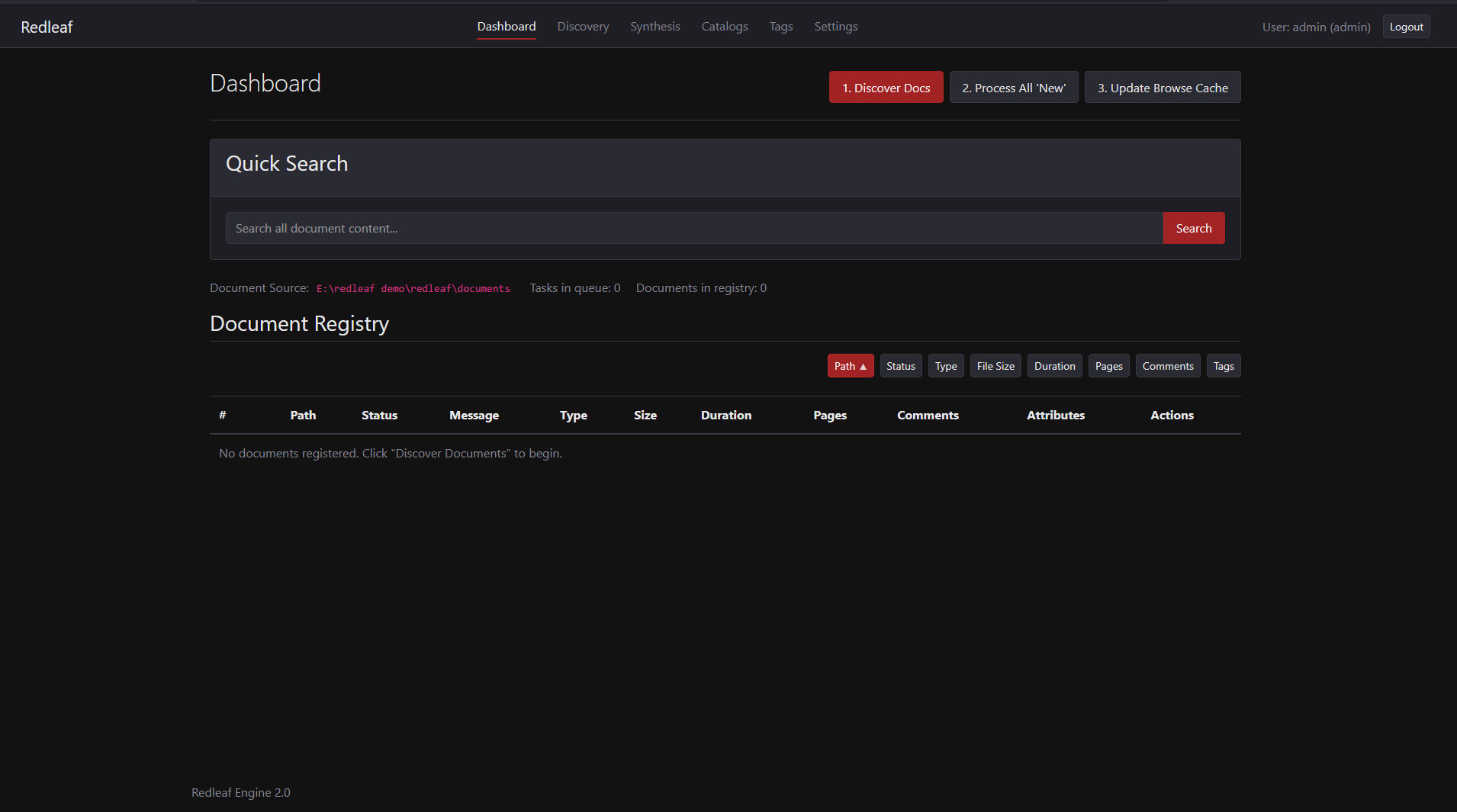
The Three Main Workflow Buttons On The Redleaf Dashboard.
The Three-Step Process
The core workflow is designed to be simple and explicit, giving you control over when your computer’s resources are used. The process consists of three sequential steps:
Redleaf Engine Update
I’ve always been struck by the fact that while our computers can store files, they don’t really understand them. That’s the idea behind Redleaf—and I’m excited to announce that version 2.0 is now ready.
For anyone new to the project, Redleaf is a local-first knowledge engine. The goal is to take a folder of documents (PDFs, transcripts, HTML, etc.) and turn it into a private, interconnected knowledge graph that you actually own and control.
Anatomy of a Hugo Theme
My recent journey into building a Hugo blog led me down a rabbit hole of complex themes.
https://gohugo.io/
While powerful, they often felt like a black box. I decided to strip everything away and ask: what are the absolute essentials to make a Hugo theme work?
To truly start from “scratch,” you first need the underlying folder structure. There is a blank slate theme that nobody talks about called Zen. It’s a bare-minimum boilerplate that sets up the necessary folders and semantic HTML without any of the bloated CSS or scripts.